# Sunburst Charts

### Chart setup to build a sunburst chart

{% stepper %}
{% step %}

#### **Axis**

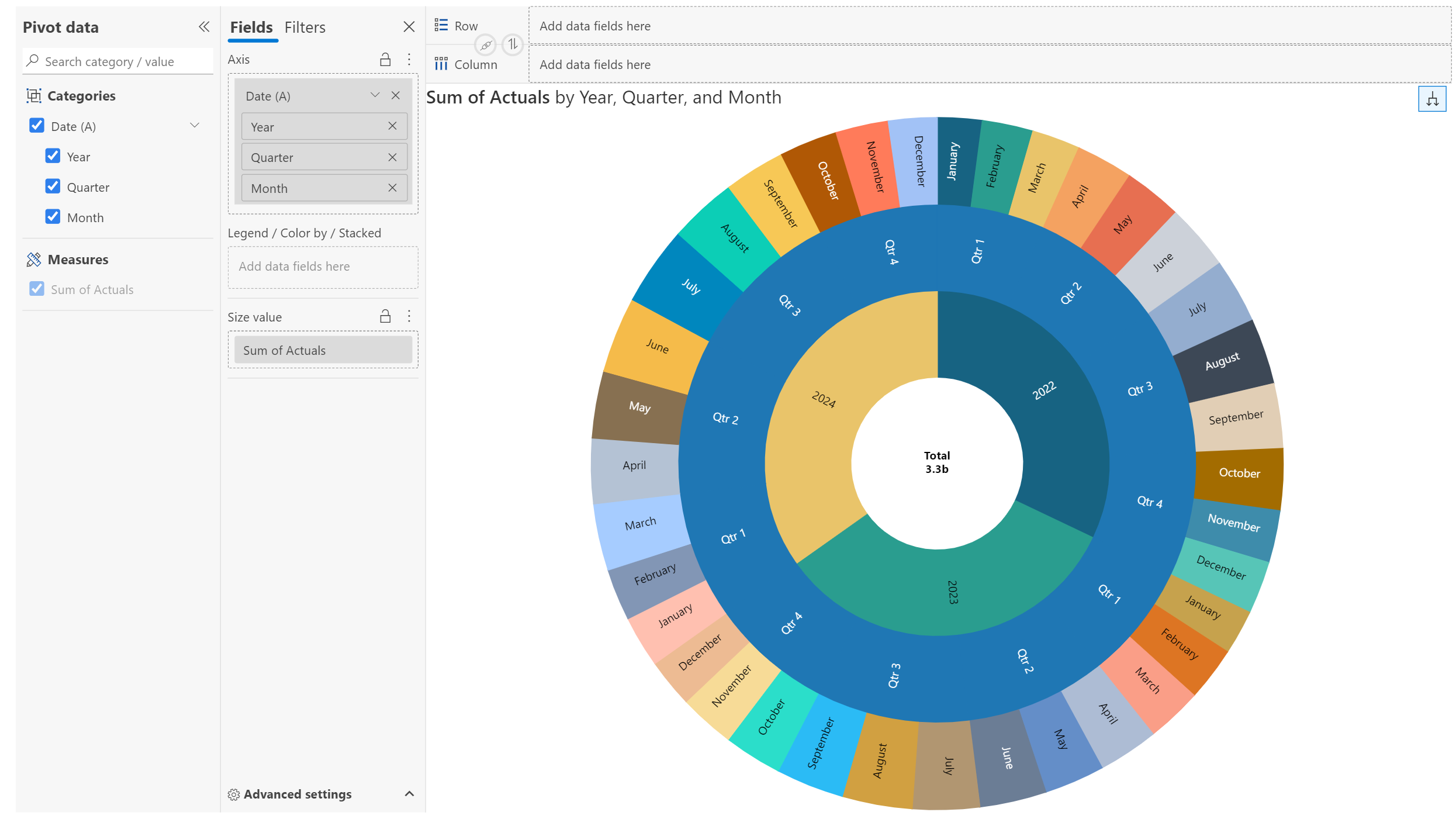
Drag a hierarchical dimension to plot on the axis (e.g., Date hierarchy).
{% endstep %}

{% step %}

#### **Values parameter**

Drag a measure to analyze (e.g., Actual).
{% endstep %}

{% step %}

#### **Chart type**

Select **Sunburst** from the Hierarchy section of the  Chart Type dropdown menu.
{% endstep %}
{% endstepper %}

> Visualize hierarchical data represented by concentric rings, with each ring representing a level in the hierarchy. In this example, we have a date hierarchy.

<figure><img src="/files/rARhNzHn6VUa4is9ZMSC" alt=""><figcaption><p>Sunburst chart</p></figcaption></figure>

### **1. Customization and formatting underCanvas settings**&#x20;

**1.1. Inner radius**

Set the radius for the inner circle using this option. Notice how the inner circle is bigger when we set the inner radius to 50.

<figure><img src="/files/fKGXgVj7o4mDsiL3pz2X" alt=""><figcaption><p>Inner radius</p></figcaption></figure>

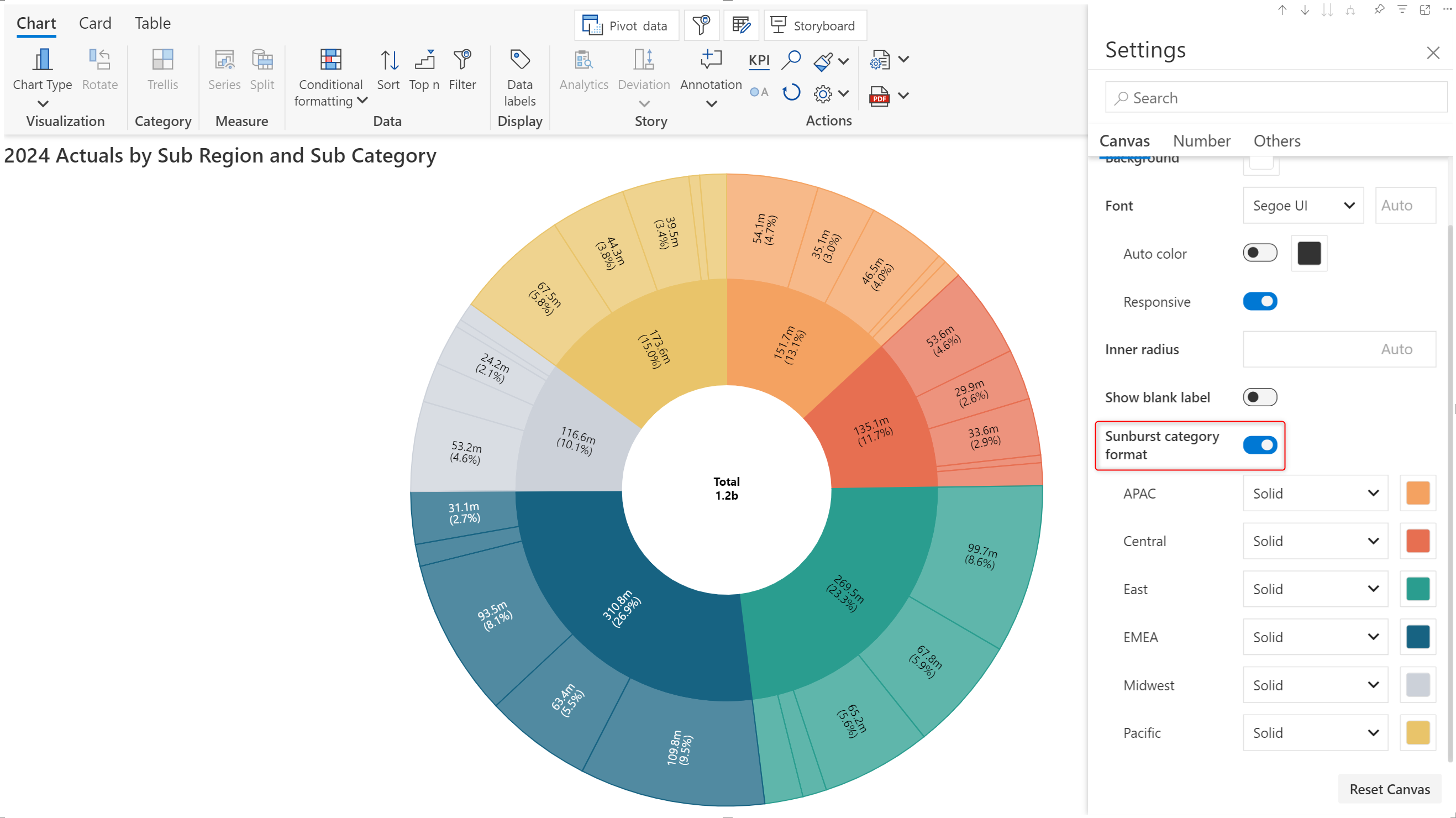
**1.2. Sunburst category format**

The same color scheme is used for the parent and child levels. The hierarchy levels can be differentiated based on the opacity.

<figure><img src="/files/Rl3KEVG7oIcDOYx6HlLz" alt=""><figcaption><p>Sunburst category format</p></figcaption></figure>

## Additional Formatting Options

Here are the other settings that help you refine your sunburst chart.

<table><thead><tr><th width="143.5">Feature</th><th>Description</th><th data-type="content-ref">Link</th></tr></thead><tbody><tr><td>Number</td><td>Configure number formatting (decimals, units)</td><td><a href="/pages/5luh7CNmlb8gDCUt1Cdo">/pages/5luh7CNmlb8gDCUt1Cdo</a></td></tr><tr><td>Legend</td><td>Show/hide and customize the legends</td><td><a href="/pages/DKKnFEcoc3dq7SY8pPwT">/pages/DKKnFEcoc3dq7SY8pPwT</a></td></tr><tr><td>Data Label</td><td>Show exact values for each data point</td><td><a href="/pages/hlfbb3nncB1Juac8B2M1">/pages/hlfbb3nncB1Juac8B2M1</a></td></tr><tr><td>Trellis</td><td>Create small multiples using category split</td><td><a href="/pages/gZGiSWPH6pyEPgCUyJ7G">/pages/gZGiSWPH6pyEPgCUyJ7G</a></td></tr><tr><td>Conditional Formatting</td><td>Apply color rules to highlight values</td><td><a href="/pages/eAlYz7nnGGHBwj0vsrG2">/pages/eAlYz7nnGGHBwj0vsrG2</a></td></tr><tr><td>Sorting</td><td>Sort axis order</td><td><a href="/pages/DBrCRJn3JzquaVGXnE0Z">/pages/DBrCRJn3JzquaVGXnE0Z</a></td></tr><tr><td>Ranking</td><td>Limit to top/bottom N categories</td><td><a href="/pages/AmGsNJOt6hyWbMuwohm6">/pages/AmGsNJOt6hyWbMuwohm6</a></td></tr></tbody></table>


---

# Agent Instructions: Querying This Documentation

If you need additional information that is not directly available in this page, you can query the documentation dynamically by asking a question.

Perform an HTTP GET request on the current page URL with the `ask` query parameter:

```
GET https://docs.inforiver.com/analytics+/quick-charts/sunburst-charts.md?ask=<question>
```

The question should be specific, self-contained, and written in natural language.
The response will contain a direct answer to the question and relevant excerpts and sources from the documentation.

Use this mechanism when the answer is not explicitly present in the current page, you need clarification or additional context, or you want to retrieve related documentation sections.