> For the complete documentation index, see [llms.txt](https://docs.inforiver.com/llms.txt). Markdown versions of documentation pages are available by appending `.md` to page URLs; this page is available as [Markdown](https://docs.inforiver.com/editable/release-notes/editable-v1.7.md).
# EDITable - v1.7
## New
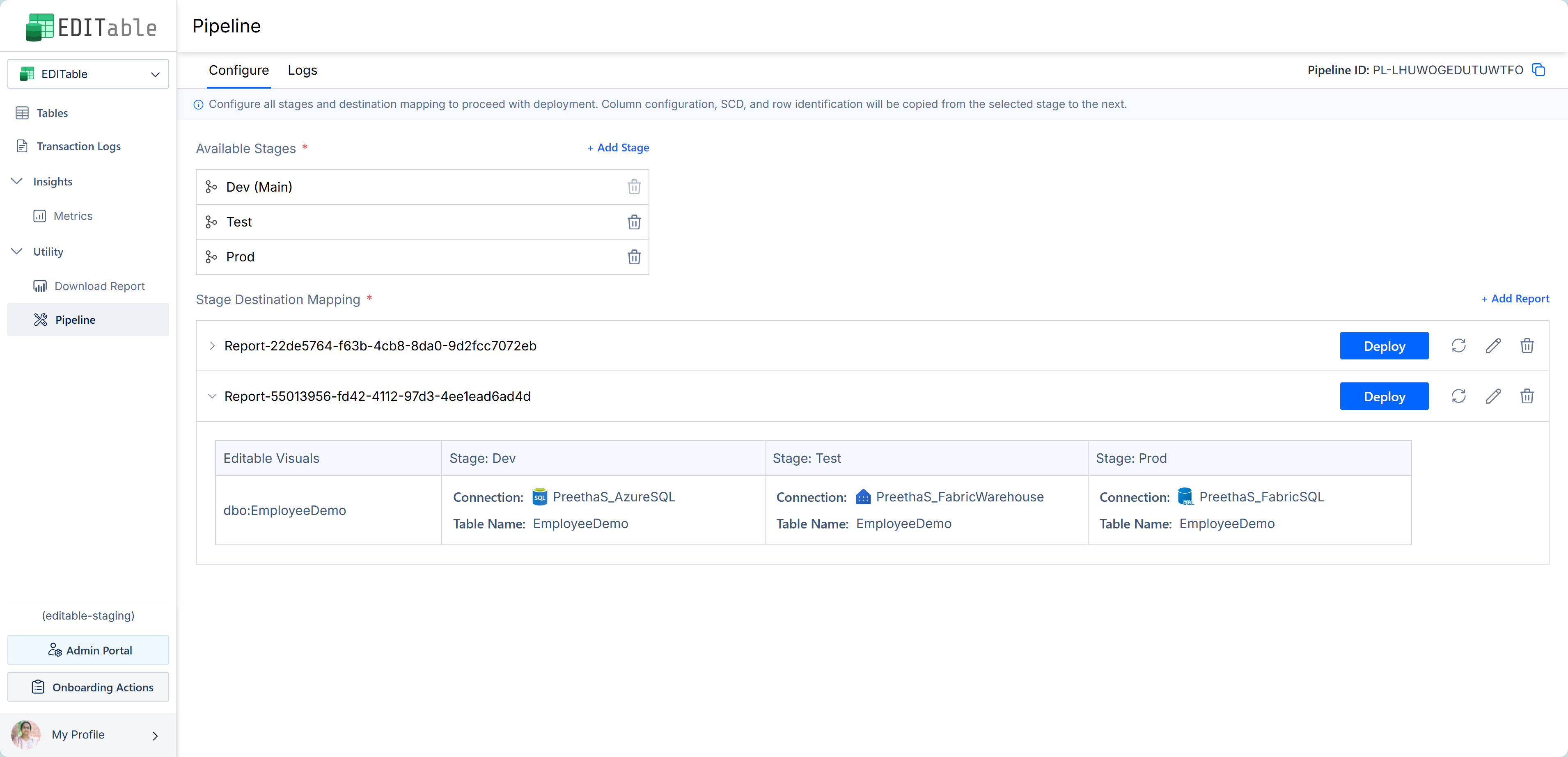
### Pipeline Deployment in EDITable
This release has a significant feature addition: the pipeline deployment.
[Power BI deployment pipelines](https://learn.microsoft.com/en-us/fabric/cicd/deployment-pipelines/intro-to-deployment-pipelines?tabs=new-ui) enable creators to develop and test content in the service before it reaches the users. The tool is designed as a pipeline with multiple stages, for example, development, test, QA, and production.
EDITable's deployment pipelines work alongside Power BI pipelines, allowing you to deploy EDITable reports in stages.
With EDITable's deployment pipelines, you can:
* Maintain streamlined version control for EDITable reports.
* Ensure the report's column configurations, SCDs, and row identification are preserved across different environments.
* Deploy your EDITable reports (and thus the tables) from one data destination to another, along with their column configuration settings, SCDs, and row identification.
* Avoid duplicate visuals that often occur when manually deploying a visual from one workspace to another.
* Trigger report deployments from external applications using an API endpoint.
Deployment Pipeline in EDITable
To know more, please refer to this section: [Pipeline](/editable/admin-portal-and-editable-console/utility/pipeline.md).
## Enhancements
### Change the background color of drop-down options.
We have added a menu option to change the background color of single-select and multi-select dropdown options.
Options Background Color
---
# Agent Instructions
This documentation is published with GitBook. GitBook is the documentation platform designed so that both humans and AI agents can read, navigate, and reason over technical content effectively. Learn more at gitbook.com.
## Querying This Documentation
If you need additional information that is not directly available in this page, you can query the documentation dynamically by asking a question.
Perform an HTTP GET request on the current page URL with the `ask` query parameter, and the optional `goal` query parameter:
```
GET https://docs.inforiver.com/editable/release-notes/editable-v1.7.md?ask=&goal=
```
`ask` is the immediate question: it should be specific, self-contained, and written in natural language.
`goal` is optional and describes the broader end goal you are ultimately trying to accomplish on behalf of the user. GitBook uses it to tailor the answer towards what is most useful for that goal.
The response will contain a direct answer to the question and relevant excerpts and sources from the documentation.
Use this mechanism when the answer is not explicitly present in the current page, you need clarification or additional context, or you want to retrieve related documentation sections.