# 12. Context Awareness

**Filter context** in **Super Filter** allows seamless cross-visual filtering within the Inforiver suite without writing DAX. Simply enabling context settings connects visuals dynamically for smarter, context-aware dashboards.

## How to Configure Filter Context in Super Filter

To enable filter context recognition across Inforiver visuals, follow these simple steps:

{% stepper %}
{% step %}
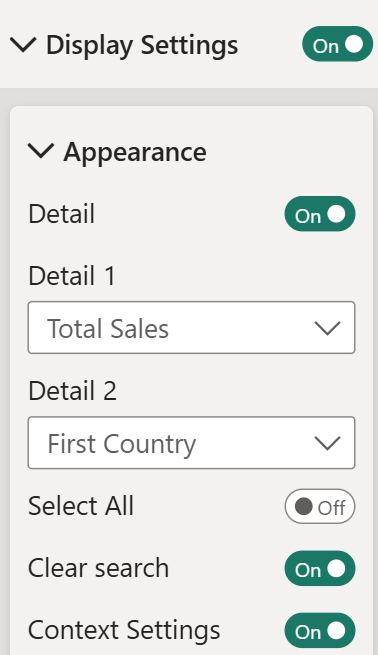
Click on the Super Filter visual and open the **Display Settings** pane. Enable **Context Settings**

<figure><img src="/files/iX0UFfefSpPfGJsspZp7" alt="" width="189"><figcaption><p>Image 1: Context Settings options in Display Settings</p></figcaption></figure>
{% endstep %}

{% step %}
Scroll down and locate the **Context Settings** section and toggle it **ON**.

<figure><img src="/files/W3RHILXnhoBg4f3oF35t" alt="" width="192"><figcaption><p>Image 2: Context Settings enabled in Format pane</p></figcaption></figure>
{% endstep %}

{% step %}
Go the Specific Inforiver visuals **Filter context settings** and select the Super Filter **visual ID**.

<figure><img src="/files/wjZxitflKkRUfdJoPNSj" alt="" width="375"><figcaption><p>Image 3: Filter context settings in Inforiver Matrix</p></figcaption></figure>

<figure><img src="/files/hXW1OOF7NT8ofr47Sz73" alt="" width="375"><figcaption><p>Image 4: Filter context settings in Inforiver Analytics+</p></figcaption></figure>
{% endstep %}

{% step %}
Once the filter context is applied, users can filter with the Super Filter slicer and add comments, annotations, or perform actions in Analytics+, Inforiver Reporting Matrix, or Writeback Matrix. These will reflect based on the applied filter context
{% endstep %}
{% endstepper %}

When using the **Inforiver suite of visuals**, you don’t need to create any **DAX measures** to configure filter context. Follow the steps mentioned above, and that's it! Inforiver handles the rest automatically, allowing visuals to **communicate seamlessly** and respond dynamically based on the active filter selections — all with just a few clicks.

## Advantages of Using the Inforiver Visual Suite

When filter context is enabled across Inforiver visuals, you can:

* Use [**dynamic header updates**](https://docs.inforiver.com/working-with-inforiver/13.-context-awareness#id-1.-context-awareness-in-report-headers) based on filter context
* Use measure information from super filter in the headers based on filter context
* Add [**annotations and contextual comments**](https://docs.inforiver.com/analytics+/working-with-analytics+/18.-context-awareness#id-4.-context-awareness-for-measure-group-headers) directly linked to filtered data
* [**Write back filter-context-specific comments** ](https://docs.inforiver.com/working-with-inforiver/13.-context-awareness#id-2.-context-awareness-in-writeback)to your data source
* Apply [**conditional formatting** ](https://docs.inforiver.com/analytics+/working-with-analytics+/18.-context-awareness)based on dynamic filter selections
* Enjoy **enhanced cross-visual filtering** with minimal configuration
* Benefit from **context-aware dashboards** that update in real-time
* Reduce need for complex **DAX calculations** or multiple slicers

{% hint style="info" %}
For more information about **Context aware Dynamic title** updates and annotations across the Inforiver visual suite, please refer to this [blog](https://inforiver.com/blog/inforiver-super-filter/dynamic-titles-and-filter-context-in-power-bi/).
{% endhint %}


---

# Agent Instructions: Querying This Documentation

If you need additional information that is not directly available in this page, you can query the documentation dynamically by asking a question.

Perform an HTTP GET request on the current page URL with the `ask` query parameter:

```
GET https://docs.inforiver.com/super-filter/features/12.-context-awareness.md?ask=<question>
```

The question should be specific, self-contained, and written in natural language.
The response will contain a direct answer to the question and relevant excerpts and sources from the documentation.

Use this mechanism when the answer is not explicitly present in the current page, you need clarification or additional context, or you want to retrieve related documentation sections.
