# 9. Manage aggregation

While working with Power BI table/matrix reports, we would sometimes like to apply custom aggregations for the measures in a specific report (e.g., average quantity sold) instead of using the default aggregation used in a data model (e.g., the sum of quantity sold).&#x20;

Premium Table’s aggregation feature allows you to override the native Power BI aggregation for measures without having to make extensive model-level changes. **You can set aggregation at the row grand totals.**

Click the **Aggregation** button in the **Insert** ribbon to open the **Manage Aggregation** interface.

<figure><img src="https://2428652681-files.gitbook.io/~/files/v0/b/gitbook-x-prod.appspot.com/o/spaces%2FsB9HAei8v4FfKkH9M4gw%2Fuploads%2FDCXLdjGouMCMwQyVfc5a%2Fimage.png?alt=media&#x26;token=b1e43674-00d0-4f98-8dac-f779c81d8ff7" alt=""><figcaption><p>Manage Aggregation</p></figcaption></figure>

* **For PY Sales, Actual Sales, and Forecast, the sum is set as row aggregation.** The row grand total for these measures will be calculated as the sum of all the rows.

### Aggregation types

#### None

Choosing 'None' performs no aggregations for the selected measure. In the example below, the 'Discount' measure is not aggregated.

<figure><img src="https://2428652681-files.gitbook.io/~/files/v0/b/gitbook-x-prod.appspot.com/o/spaces%2FsB9HAei8v4FfKkH9M4gw%2Fuploads%2FwhLMpGxb6wnTH2F3Eyaj%2Fimage.png?alt=media&#x26;token=2191f267-4131-4f20-b955-e46a4afcb281" alt=""><figcaption><p>Row aggregation is 'None'</p></figcaption></figure>

#### Sum

'Sum' aggregation displays the sum of the child rows as the aggregate. In the example below, the *Actual Sales* column is the sum of its child rows.

<figure><img src="https://2428652681-files.gitbook.io/~/files/v0/b/gitbook-x-prod.appspot.com/o/spaces%2FsB9HAei8v4FfKkH9M4gw%2Fuploads%2FEbZZiwlTnMJdd7hkuvQy%2Fimage.png?alt=media&#x26;token=c81f1446-abcd-49e3-8e42-7ab22e62a30c" alt=""><figcaption><p>Row aggregation is 'Sum'</p></figcaption></figure>

#### Minimum

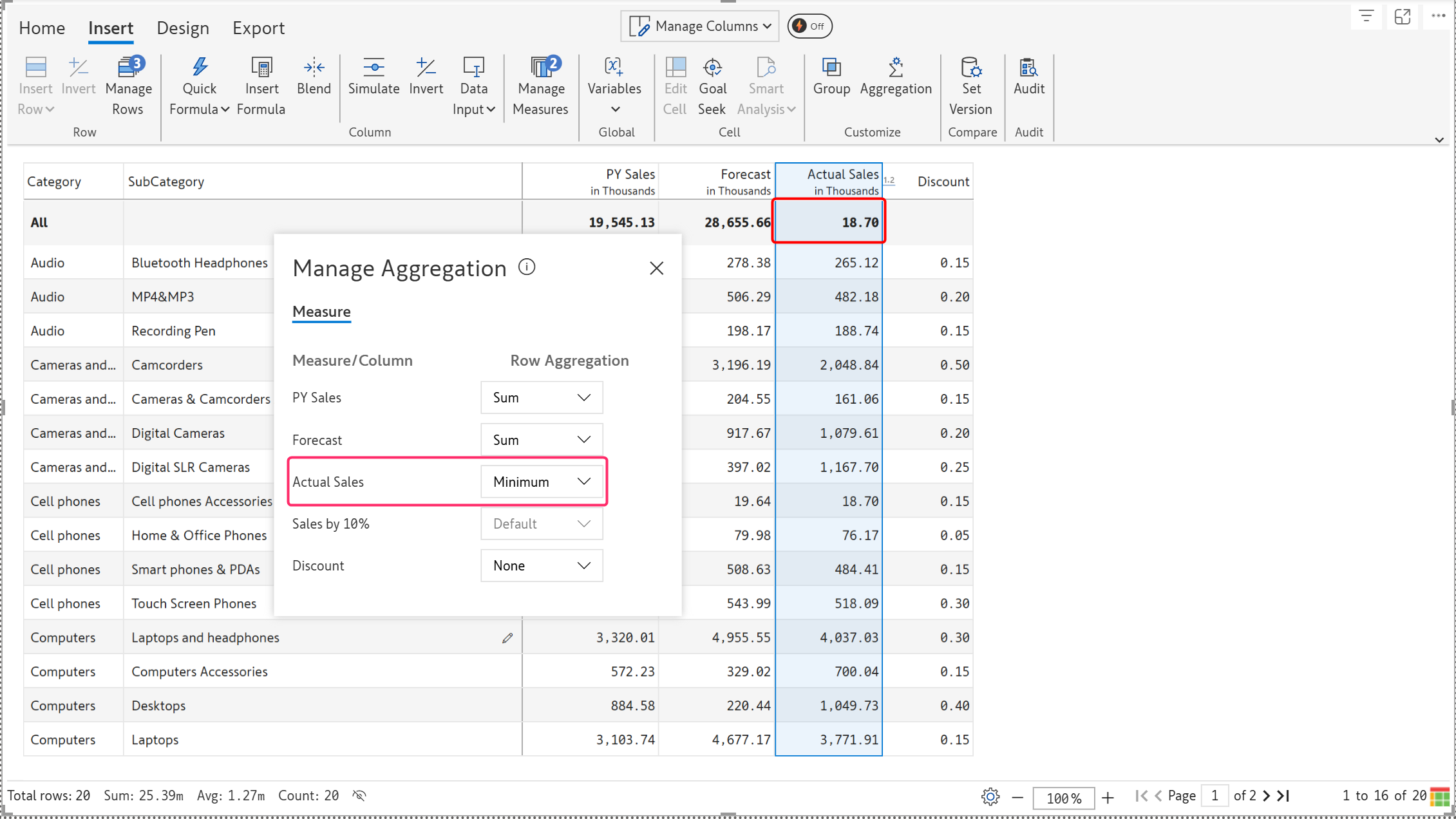
The 'Minimum' aggregation shows the minimum value of all rows as the aggregate. The aggregation for the Actual Sales measure is set to 'Minimum', so it displays the lowest value in that measure.

<figure><img src="https://2428652681-files.gitbook.io/~/files/v0/b/gitbook-x-prod.appspot.com/o/spaces%2FsB9HAei8v4FfKkH9M4gw%2Fuploads%2Fgo71h8fVeyDqtrsWcVPa%2Fimage.png?alt=media&#x26;token=3ee25beb-ae9c-4490-879f-6517b9f23111" alt=""><figcaption><p>Row aggregation is 'Minimum'</p></figcaption></figure>

#### Maximum

The 'Maximum' aggregation shows the maximum value of all rows as the aggregate. The aggregation for the Actual Sales measure is set to 'Maximum', so it displays the highest value in that measure.

<figure><img src="https://2428652681-files.gitbook.io/~/files/v0/b/gitbook-x-prod.appspot.com/o/spaces%2FsB9HAei8v4FfKkH9M4gw%2Fuploads%2FE19bk85hXFZV6fkCM1h3%2Fimage.png?alt=media&#x26;token=f55c1973-f170-447a-a9a1-c57a156d70fb" alt=""><figcaption><p>Row aggregation is 'Maximum'</p></figcaption></figure>

#### Average

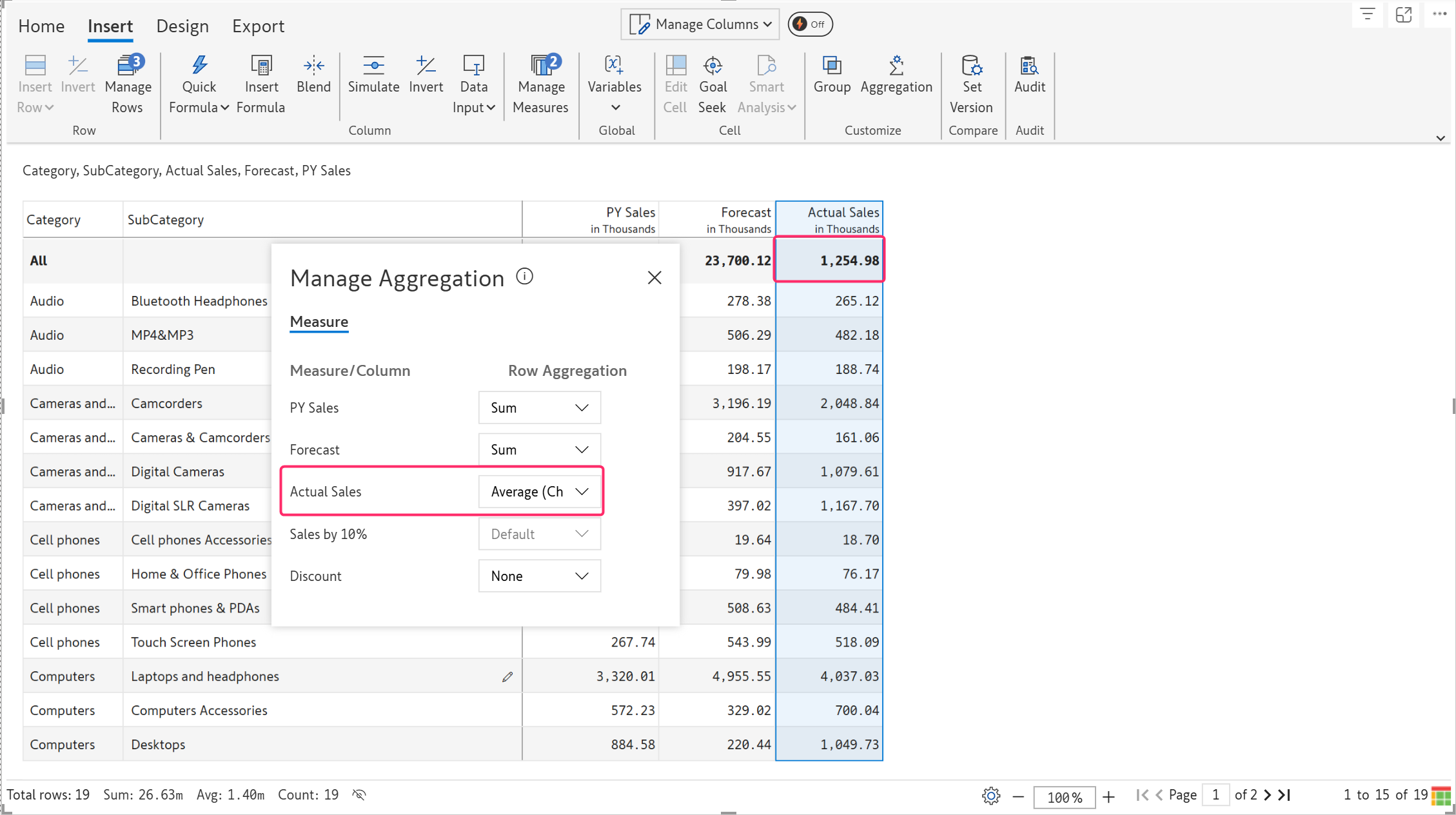
The 'Average' aggregation shows the average of the rows as a row aggregation. In the example below, when the aggregation is set to 'Average', the average sales is calculated at the grand total level.

<figure><img src="https://2428652681-files.gitbook.io/~/files/v0/b/gitbook-x-prod.appspot.com/o/spaces%2FsB9HAei8v4FfKkH9M4gw%2Fuploads%2F2amFqDk7pG4bUgP76vsp%2Fimage.png?alt=media&#x26;token=7c89c4a0-3c68-4c40-b261-659548b38e92" alt=""><figcaption><p>Row aggregation is 'Average'</p></figcaption></figure>

#### Standard deviation

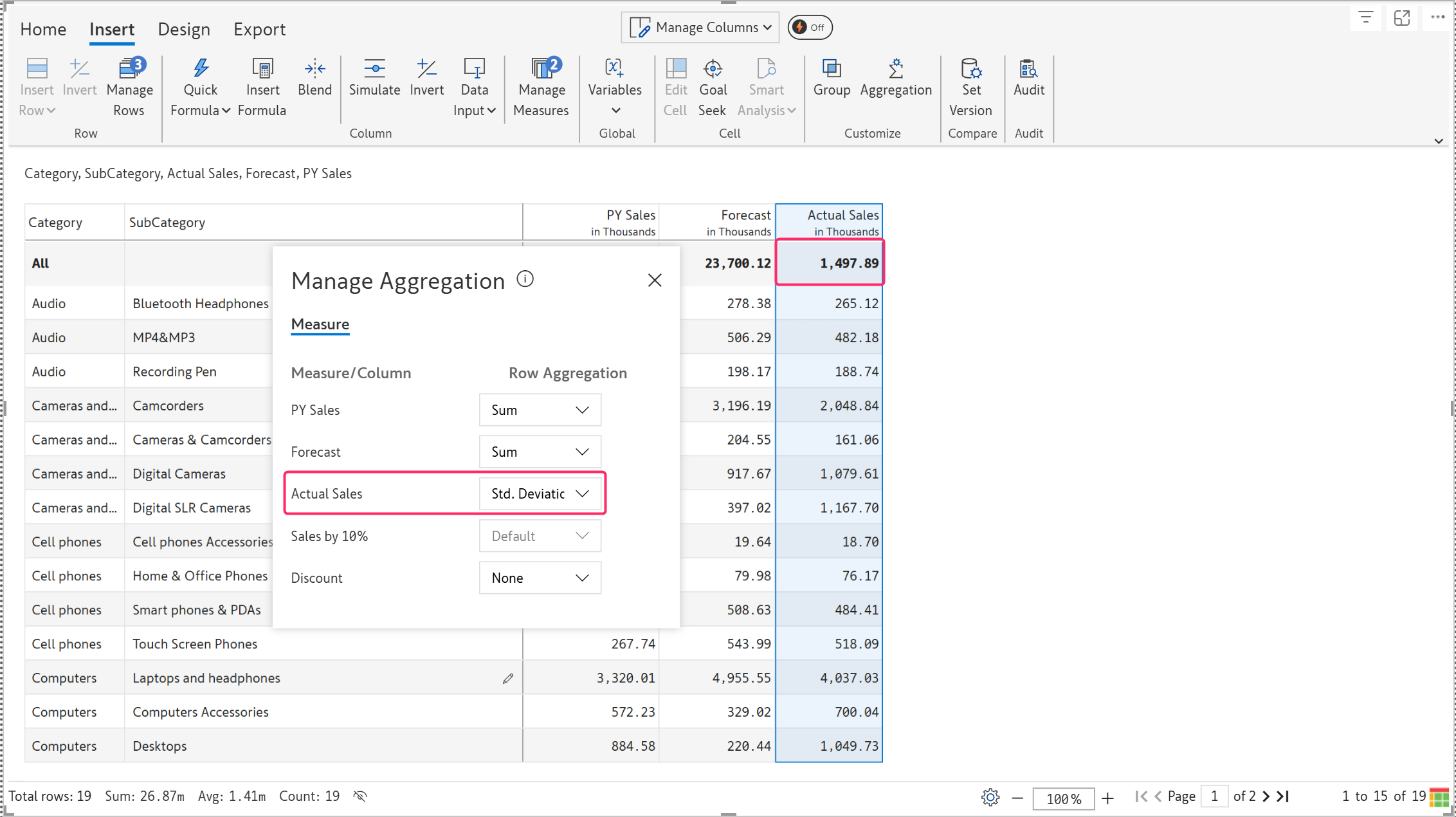
'Standard deviation' aggregation displays the standard deviation of the child rows as the aggregate.&#x20;

<figure><img src="https://2428652681-files.gitbook.io/~/files/v0/b/gitbook-x-prod.appspot.com/o/spaces%2FsB9HAei8v4FfKkH9M4gw%2Fuploads%2F8N6e0gZVA0YyVdbAplqp%2Fimage.png?alt=media&#x26;token=b6714edb-93d0-43db-9cb7-6a42f247d535" alt=""><figcaption><p>Standard Deviation as aggregation type </p></figcaption></figure>

#### Visible rounding

'Visible rounding' aggregation rounds off values in a way that the individual row values add up properly to the grand total. This is a common requirement in external financial statement reporting, including income and balance sheet reporting.

<figure><img src="https://2428652681-files.gitbook.io/~/files/v0/b/gitbook-x-prod.appspot.com/o/spaces%2FsB9HAei8v4FfKkH9M4gw%2Fuploads%2F4CbZ2ia1gcR0uwVCOkyg%2Fimage.png?alt=media&#x26;token=a1794d68-a0f7-4af2-a5d3-87f15f63c69a" alt=""><figcaption><p>Visible rounding</p></figcaption></figure>

#### First

This aggregation type is often used in time-series data or any sequential dataset. The 'First' aggregation type displays the first value from the set of rows. This is especially useful when we need to record the dataset's initial state or value.&#x20;

<figure><img src="https://2428652681-files.gitbook.io/~/files/v0/b/gitbook-x-prod.appspot.com/o/spaces%2FsB9HAei8v4FfKkH9M4gw%2Fuploads%2FftHHYLAaWsWyTu7gVGuT%2Fimage.png?alt=media&#x26;token=ae4d3df7-cb28-4cac-8ea9-da9588d26347" alt=""><figcaption><p>'First' aggregation</p></figcaption></figure>

#### Last

This aggregation type is used in time-series data or any sequential dataset. The 'Last' aggregation type displays the last value or the latest value from the set of rows. This is useful when we need the most recent value in a dataset, especially when budgeting for the following year by carrying over the previous year's value.&#x20;

<figure><img src="https://2428652681-files.gitbook.io/~/files/v0/b/gitbook-x-prod.appspot.com/o/spaces%2FsB9HAei8v4FfKkH9M4gw%2Fuploads%2F25OKPW4nAJowUx4LMtav%2Fimage.png?alt=media&#x26;token=434e9574-add4-4e68-af0f-8d2dc68b9ada" alt=""><figcaption><p>'Last' aggregation</p></figcaption></figure>